Showing posts with label Software. Show all posts

Saturday, June 16, 2012

Cara Menggabungkan Subtitle

Cara Menggabungkan Subtitle - Di artikel kali ini Azhie.net akan membagikan tips mudah cara menggabungkan subtitle supaya bisa di play dan bisa terbaca di player seperti MPC.

Bagi orang yang sudah terbiasa dalam dunia download film pasti hal ini adalah suatu hal yang sangat mudah, sehingga artikel ini kami tujukan kepada seorang yang baru dan newbie saja ^^.

Misalnya di artikel sebelumnya di Download Film Snow White And The Huntsman Subtitle Indonesia , disana pasti file subtitle dan videonya terisah menjadi dua file dan hampir semua film memang dibuat terpisah, yang satu video dan satunya file subtitle yang biasanya berformat .ass atau .srt.

Cara Menggabungkan Subtitle

Lalu bagaimana menggabungkan subtitle tersebut? Oke simak cara sederhana menggabungkan subtitle di bawah ini ya.

Cara Mudah Menggabungkan Subtitle
1. Tempatkan video dan file subtitle menjadi 1 folder
2. Samakan nama subtitle dan nama video menjadi 1 nama atau di rename.
Misalnya file video kita beri nama The Avengers 2012.mkv dan untuk subtitle juga kita beri nama The Avengers 2012.srt
3. Jika nama sudah sama kita tinggal memainkan saja file videonya saya jamin lancar jika file subtitle timing nya sudah pas dan tidak terlambat.

Oke sekian postingan mengenai Cara Sederhana Menggabungkan Subtitle, sebenarnya ada juga cara menggabungkan subtitle menjadi 1 file saja menggunakan aplikasi mkvmerge GUI tapi untuk pemula cara ini saja sudah bagus kok.

Wednesday, June 13, 2012

Adobe Dreamweaver CS6

Download Adobe Dreamweaver CS6 Crack Patch Serial Number - Setelah kemarin sharing mengenai Download Adobe Photoshop CS6 Crack Patch Serial Number, sekarang gantian Adobe Dreamweaver yang juga sudah masuk ke versi CS6.

Apa saja fitur terbaru di Adobe Dreamweaver CS6? Fitur tersebut dapat kita baca di bawah ini tapi masih memakai bahasa Bule ya soalnya lagi malas translete.

Fitur Adobe Dreamweaver CS6

-Fluid Grid Layout
Create cross-platform and cross-browser-compatible web designs using the CSS3-based Fluid Grid Layout system. Work faster and more efficiently as you develop projects using clean, industry-standard code for a wide range of devices and computers. Visually construct complex web designs and page layouts without getting buried in code.

-Improved FTP performance
Save time uploading larger files with the reengineered multithreaded FTP transfer tool. Upload site files faster and more efficiently to speed production time.

-Adobe Business Catalyst integration
Use the integrated Business Catalyst panel in Dreamweaver to connect and edit sites you build with Adobe Business Catalyst (available separately). Build e-commerce sites with the hosted solution.

-Enhanced jQuery Mobile support
Build native mobile apps for iOS and Android platforms using updated support for jQuery Mobile. Build apps to reach mobile audiences while streamlining your mobile development workflow.

-Updated PhoneGap support
Updated support for Adobe PhoneGap™ makes it easier to build and package native apps for Android and iOS. Create mobile apps by repurposing existing HTML code. Use PhoneGap emulators to check your designs.

-CSS3 transitions
Animate changes to CSS properties as transitions to bring web designs to life. Maintain greater control of web design as you finesse page elements and create captivating effects.

-Updated Live View
Test pages before publishing using updated Live View functionality. Live View now uses the latest version of the WebKit rendering engine to provide the ultimate in HTML5 support.

-Updated Multiscreen Preview panel
Check the display of projects built for smartphones, tablets, and desktops with the updated Multiscreen Preview panel. This enhanced panel now enables you to check rendering of HTML5 content.

Cara instalasi Adobe Dreamweaver CS6

1) Install aplikasi dalam mode trial (tidak butuh serial). jalankan aplikasi dan pilih mode trial lalu tutup aplikasi.

2) buka folder DLL copy file dll nya dan paste ke direktori.

C:\Program Files (x86)\Adobe\Adobe Dreamweaver CS6 > (Win 64bit)

atau

C:\Program Files\Adobe\Adobe Dreamweaver CS6 > (Win 32bit)

Note:
Di folder DLL ada folder original 32bit itu buat backup jika gagal/ error

Ingat pastika anda telah memututskan dulu komputer atau leptop anda dengan koneksi internet karena adanya koneksi internet dapat menyebabkan kegagalan instalasi.

Untuk Download Adobe Dreamweaver CS6 Crack Patch Serial Number silahkan klik link di bawah ini.

Mediafire 2 Part pasword : darkwatch

[Download part1] [Download part2]

Oke semoga berhasil dalam instalasi dan download Adobe Dreamweaver CS6, sekarang saatnya Nonton Live Streaming EURO 2012 dulu.

Friday, June 1, 2012

Download Adobe Photoshop CS6 Crack Patch Serial Number

Download Adobe Photoshop CS6 13.0 - Seiring berkembangnya Internet versi-versi software pun juga semakin sering ada update terbaru, salah satunya adalah Adobe Photoshop CS6.

Di dalam Adobe Photoshop CS6 banyak memiliki fitur baru, fitur Adobe Photoshop CS6 di antaranya bisa anda baca di bawah ini, tapi masih dalam bahasa inggris ya.

Fitur Adobe Photoshop CS6
Photoshop CS6 Extended Features

Enhance your creativity and boost your productivity. Adobe® Photoshop® CS6 Extended software delivers blazingly fast performance with the new Adobe Mercury Graphics Engine, groundbreaking new Content-Aware tools, simplified 3D artwork creation, reengineered design tools, and more.*

Content-Aware Patch : Patch images with greater control using Content-Aware Patch, which allows you to choose the area that Content-Aware will use to create your patch.

Mercury Graphics Engine : See near-instant results when you're editing images with key tools such as Liquify and Puppet Warp, creating 3D artwork, and working with matte paintings and other large files.*

3D performance boost : Experience enhanced performance throughout your 3D workflows. View shadows and reflections in all editing modes, quickly render final work in Adobe RayTrace mode thanks to the Mercury Graphics Engine, and much more.*

3D controls at your fingertips : Use a vastly simplified user interface to intuitively create and animate 3D artwork. Use in-context and on-canvas controls to manipulate cages for 3D extrusions, change the orientation of scenes and objects, edit lights, and more.*

New and reengineered design tools : Create superior designs faster. Get consistent formatting with type styles, use vector layers to apply strokes and add gradients to vector objects, easily create custom strokes and dashed lines, quickly search layers, and more.

New Blur Gallery : Quickly create photographic blur effects using a simple new interface with on-image controls. Create tilt-shift effects, blur everything and then sharpen one focal point, or vary the blurriness between multiple focal points. The Mercury Graphics Engine delivers immediate results.*

All-new Crop tool : Crop images faster and with greater precision using the all-new, nondestructive Crop tool. Manipulate your images on canvas, and take advantage of the Mercury Graphics Engine to see your adjustments happen live.*

Modern user interface : Work with a fresh, elegant interface featuring dark background options that make your images pop, and benefit from hundreds of design touches that create a smoother, more consistent editing experience.

New reflections and draggable shadows : Quickly achieve 3D realism by adding and enhancing shadows and reflections on your ground plane. Drag a shadow to reposition the light source, and easily edit ground reflections, shadows, and other effects.*

Intuitive video creation : Bring Photoshop image editing power to your videos. Easily enhance any clip using the full range of familiar Photoshop editing tools, and combine clips and stills with transitions, audio, and effects such as pan and zoom.

Background Save : Keep on working even while saving the largest of Photoshop files in the background — a performance improvement that can help your productivity soar.

Auto-recovery : Let the auto-recovery option work behind the scenes to save your edits without interrupting your progress. A copy of your work is saved every 10 minutes and recovered in the event of an unexpected shutdown.

Easy alignment and distribution of 3D objects : Create rich 3D scenes in less time now that you can automatically align 3D objects to the vanishing point in your image and manipulate a group of 3D objects at one time using a new multiselect option.*

Dozens of user-inspired improvements : Save time with more than 65 new creativity and productivity enhancements that originated as suggestions from Photoshop users via Facebook, Twitter, and more.

Preset migration and sharing : Easily migrate your presets, workspaces, preferences, and settings so you can experience Photoshop in the same way on all your computers, share your setup, and bring your customizations from past versions into Photoshop CS6.

Content-Aware Move : Move or extend a selected object to another area of your image, and then watch as Content-Aware Move magically recomposes and blends the object for a stunning visual result.

Revolutionary erodible brushes : Draw more naturally and realistically using drawing tips that erode as you work. Endlessly wear down and sharpen a charcoal pencil or pastel to create different effects, and save favorite blunted tips as presets.

New painting presets : Simplify painting with new presets that offer a good starting point for creating realistic painting effects.

Scripted Patterns : Generate geometric pattern fills faster with Scripted Patterns.

Enhanced 3D animation : Animate all 3D properties — including cameras, lights, materials, and meshes — using the Animation timeline. Final rendering performance is now much improved during export of your 3D animation.*

Flexible render modes for shadows : Work more fluidly now that you can preview shadows in both GL and Adobe RayTrace render modes.*

Accurate 3D object merge : Accurately merge multiple 3D objects in a single scene so they can interact with the same lighting and cameras.*

Alternate views : Easily view your 3D artwork from multiple angles while editing.*

3D stereo viewing and printing : Easily import common stereo formats, such as JPS and MPO, into the 3D pipeline, and make simple adjustments to set depth and range. View a stereo image on stereo monitors or TVs, or print it as a lenticular 3D image.*

Adobe Flash 3D export : Easily export 3D artwork in Adobe Flash® 3D format for viewing in web browsers. Also export 3D artwork assets for use in Adobe Flash Builder® software (sold separately).*

3D sketch and cartoon presets : Click once to give your 3D objects the look of sketches or cartoons, and automatically create sketch presets by creating any brush stroke.*

Improved 3D extrusion engine : Create stunning 3D logos and artwork from any text layer, selection, path, or layer mask with the improved 3D extrusion engine, which offers faster editing, on-canvas controls, and better beveling options.*

Type styles : Save time and ensure a consistent look with type styles, which let you apply formatting to selected characters, lines, or paragraphs of text with a single click.

Vector layers : Use vector layers to apply strokes and even add gradients to vector objects.

Sharper vector rendering : Get sharper rendering by clicking once to snap the edges of vector objects to pixels.

Custom strokes and dashed lines : Easily create custom strokes and dashed lines.

Layer search : Use layer search capabilities to quickly zero in on the layer you need.

Lighting Effects Gallery : Get better performance and results with the new, 64-bit Lighting Effects Gallery. The plug-in is powered by the Mercury Graphics Engine and offers on-canvas controls and previews that make it easier to visualize your lighting enhancements.*

Oil Painting filter : Quickly give your work the look of a fine painting with the Oil Painting filter powered by the Mercury Graphics Engine. Control the style of your brush as well as the direction and shine of your lighting for a superior look.

Airbrush tips : Create realistic airbrush effects using fluid, lifelike controls and granular paint particles.

Brush enhancements : Paint more naturally by manually changing the rotation of your paint brush with your mouse. Dynamically resize your brushes with shortcuts, and take advantage of the Mercury Graphics Engine to fluidly adjust opacity or hardness.

10-bit deep color support : Get a more accurate representation of how your images will appear in film with 10-bit monitor support. See just the pixels you’ve captured, reduce or eliminate the need for dithering, and reduce contouring or banding.†

Support for 3D LUTs : Retouch images for film more easily with 3D lookup tables (LUTs) — including Adobe SpeedGrade™ .Look color LUTs — that you can turn on when you need to tweak raw color data.

OpenEXR transparency preferences : Choose whether you'd like to handle alpha channels in OpenEXR files as alpha channels or transparency.

Properties panel : Save time with a context-sensitive Properties panel that lets you make quick updates to the properties of your masks, adjustments, and 3D content.

Adobe Bridge CS6 : Manage your media faster — especially when working with large image files. Adobe Bridge CS6 offers cross-platform 64-bit support and a range of user interface and database enhancements.

Redesigned Adobe Mini Bridge : Access your images and documents more quickly and easily in Adobe Mini Bridge, redesigned as an elegant filmstrip.

New heads-up displays : Use heads-up displays to get greater precision when selecting and transforming objects and text.

Enhanced TIFF support : Work with a larger range of TIFF files. Enhanced TIFF support allows for greater bit depths and larger file sizes.

Automatic resampling : Get great results when resizing an image — the best resample method is automatically selected.

Filler text : Save time with the ability to insert "Lorem ipsum" filler text when working with type.

Increased maximum brush sizes : Edit and paint with brush sizes all the way up to 5000px.

Download Adobe Photoshop CS6

Link Download Adobe Photoshop CS6

http://www.indowebster.com/download/files/adobe_photoshop_cs6_part1
http://www.indowebster.com/download/files/adobe_photoshop_cs6_part2
http://www.indowebster.com/download/files/adobe_photoshop_cs6_part3
http://www.indowebster.com/download/files/adobe_photoshop_cs6_part4

Cara Install Adobe Photoshop CS6

1. Install application from "Adobe CS6" folder by double clicking on
the "Set-up.exe"
2. Choose TRY install.
3. Select your language.
4. Copy "adobe.photoshop.cs6-patch.exe" from "patch - PainteR" folder
and paste iy in to the installation folder. It is generally ;
C:\Program Files\Adobe\Adobe Photoshop CS6
5. Run the patch.
6. IMPORTANT : Some security programs may give warning. It is false
positive. (Virus total result is 13/42)
7. Patch will block trial check and activate Adobe Photoshop CS6 but
for your safety use firewall to stop internet connection of application.

Download Crack Patch Serial Number Adobe Photoshop CS6

http://www.indowebster.com/download/files/apcs6ext_crack_patch_instructions

Pasword : bent0811

Semoga berhasil Download Adobe Photoshop CS6 Crack Patch Serial Number , baca juga Jadwal Skema Bagan Kalender Pertandingan EURO 2012.

Monday, May 21, 2012

Cara Mudah dan Cepat Download Torrent

Cara Mudah dan Cepat Download Torrent - Sudahkah teman-teman mendengar kata "Torrent" ? Kalau anda tukang download pasti sering menjumpai hal itu dalam dunia downloader. Lalu apa itu Torrent dan bagaimana cara download lewat Torrent?

Torrent adalah sebuah metode untuk berbagi file tetapi berbeda dengan sistem file hosting, karena Torrent menggunakan sistem Peer to Peer. Apa itu Peer to Peer tidak usah perlu tahu nanti malah tambah mumet. Yang paling penting anda bisa dengan Mudah dan Cepat download lewat Torrent.

Oke sipp langsung saja ke inti permasalahan tentang Cara Download Melalui Torrent.
1. Pertama download software untuk download torrent yakni µTorrent / uTorrent.
Klik Disini Untuk Download uTorrent.

2. Setelah download UTorrent selesai kemudian installah UTorrent tersebut kemudian jalankan programnya.

3. Jika meminta update , langsung saja klik oke dan tunggu proses update dan instalasi sampai selesai.

4. Setelah semua persiapan selesai, carilah link torrent yang ingin anda unduh, otomatis software uTorrent akan mendeteksi torrent tersebut lalu mulai proses download.

Cara Mudah dan Cepat Download Torrent

Perlu di ingat tak selamanya download lewat torrent itu lambat dan juga jika hanya terdapat Seeds yang sedikit tetapi Leecher nya banyak otomatis kecepatan akan menurun apalagi jika tidak ada yang Seed Torrrent tersebut dijamin tak bisa di download.

Oke trimakasih telah membaca Cara Mudah dan Cepat Download Torrent, baca juga Cara Setting LAN Windows 7.

Wednesday, April 18, 2012

Trik Cara Memainkan Game Playstation 2 di PC

Trik Cara Bermain game playstation 2 di PC - Sebenarnya bisa apa tidak memainkan Game Playstation 2 di PC? Jawabannya sangat sederhana yakni bisa jika komputer anda mendukung dan memenuhi spesifikasi minimum untuk memainkan Game Playstation 2 di PC. Lalu apa software / alat untuk memainkan game ps2 di PC?

Supaya bisa memainkan game ps2 di komputer anda diperlukan adalah emulator ps2. Emulator PS 2 adalah sebuah software yang mudahnya untuk membuat seakan-akan komputer kita adalah PS2. Sehingga kita bisa bermain PS2 di Komputer, PC, Laptop tanpa perlu membeli PS 2.

Trik Cara Memainkan Game Playstation 2 di PC

Trik Cara Memainkan Game Playstation 2 di PC

Ada begitu banyak jenis emulator ps2 dari berbagai developer namun yang menurut saya mendekati konsole ps2 adalah PCSX2 .Silahkan download Emulator PS 2 PCSX2 melalui link di bawah ini.

Free Download Emulator PS2 PCSX2

Sebelum menginstal dan Setting Emulator PS2 PCSX2 pastikan komputer anda memiliki spesifikasi seperti di bawah ini:
Processor : intel pentium dual core atau diatasnya
RAM minimal : 1GB(untuk XP) , 2GB (untuk vista, windows7)
VGA min : 256MB Nvidia/Ati radeon

Cara Setting Emulator PS 2 PCSX2

Setelah kita menginstall PCSX2 langkah selanjutnya adalah mencari komponen tambahan untuk emulator tersebut yaitu BIOS dan Plugin
BIOS
Download ps2 BIOS Disini
http://h1.ripway.com/noaforce/SCPH-70012_BIOS_V12_USA_200.bin
Atau
http://www.4shared.com/file/83361320/32efbfed/SCPH-70012_BIOS_V12_USA_200.html
PLUGIN
http://www.4shared.com/get/83626518/2b0e1764/Plugin_ps2.html

Langkah selanjutnya adalah setting PCSX2 emulator
Mensetting PCSX2 emulator
Buka software PCSX2 anda dengan mengklik pcsx2.exe jika tidak bisa coba pcsx2t.exe (non VM version) akan ada 2 jendela yaitu untk setting dan output,berikut langkah2nya
1.Copy file BIOS ke folder bios di direktori pcsx2 lewat windows explore
Contoh: C:\program files\pcsx2\bios

2. Copy semua plugin ke folder plugins di direktori pcsx2 lewat windows explore
Contoh: C:\program files\pcsx2\plugins

3. Buka PCSX2 kemudian pilih config dan configure untuk setting

4. Pilih set BIOS direktori dan set plugin direktori untuk menentukan lokasi dimana BIOS dan plugin disimpan
Contoh: C:\program files\pcsx2\bios
C:\program files\pcsx2\plugins

5. Lakukan configurasi plugin,contohnya seperi di bawah ini.
Graphics
GSdx9 (MSVC 14.00, SSE2) 0.10.0
Membutuhkan DirectX terbaru dari microsoft ,jika anda malas mendownloadnya silahkan coba yg ZeroGS KOSMOS 0.97.1 pilih configure di sub menu graphics jika ingin mensetting plugin yg dipilih
Controller
Lilypad 0.9.2 kemudian pilih configure untuk menyesuaikan keyboard/USB joystick dengan tombol controler asli ps2.
CDDVD rom
P.Eop.S. CDDVD (CDDA mod) 1.3.0 pilih configure dan tentukan drive tempat DVD game ps2 dimasukan
USB
Qemu USB by Gigaherz 0.1.0
Digunakan untuk sambungan joystick USB

Sekian cara Setting Emulator PS2 PCSX2 di PC, silahkan masukan DVD game ps2 anda dan pilih file -> run jika berhasil maka game ps 2 akan langsung berjalan di PC anda.

Sunday, April 1, 2012

SMS Bomber Aplikasi Ngebom SMS Android

SMS Bomber Aplikasi Ngebom SMS Android - Sms bomber ini pada dasarnya berfungsi untuk nyepam ke handphone musuh teman kita. Dengan aplikasi SMS Bomber kita bisa mengirim ratusan sms sesuai jangka waktu / delay yang kita inginkan.

SMS Bomber Aplikasi Ngebom SMS Android

SMS Bomber ini hanya bisa digunakan untuk smartphone beroperasi Android tapi untuk handphone target tidak harus android, handphone jadul pun bisa. Kami tidak bertanggung jawab apabila terjadi kerusakan pada handphone yang terkena spam lho.

Pengen tau bagaimana cara Ngebom SMS langsung saja Download Aplikasi SMS Bomber Aplikasi Ngebom SMS Android

[Download Here]

Saturday, March 17, 2012

Driver Netbook Acer Happy Aspire One Lengkap

Driver Netbook Acer Happy Aspire One - Pernah mendapat kasus hilang Driver Netbook Acer Happy Aspire One dan kesulitan mencari Driver Netbook Acer Happy Aspire One ? Memang sih Acer Happy Aspire One tanpa di isntal driver pun masih tetap bisa digunakan, sound sudah bisa keluar jika memakai OS Windows 7 tapi VGA yang menjadi permasalahan. Dengan belum di instalnya Driver VGA Netbook Acer Happy Aspire One tidak akan berjalan dengan mulus.

Bagi yang kehilangan Driver Netbook Acer Happy Aspire One jangan khawatir karena melalui postingan ini anda bisa mendapatkan Driver Netbook Acer Happy Aspire One secara gratis dan mudah didownload.

[Download Driver VGA Netbook Acer Happy Aspire One]

[Download Driver Wireless LAN Broadcom Netbook Acer Happy Aspire One]

[Download Driver CardReader Netbook Acer Happy Aspire One]

[Download Driver Chipset Netbook Acer Happy Aspire One]

[Download Driver Audio Suara Netbook Acer Happy Aspire One]

[Download Driver Bluetooth Netbook Acer Happy Aspire One]


Driver Netbook Acer Happy Aspire One Lengkap tersebut bisa digunakan untuk Driver Netbook Acer Happy Aspire One Lainnya untuk sistem operasi Windows 7, Windows 7 (x64), Windows Vista, Windows Vista (x64), Windows XP, jika anda tidak mempunyai atau kehilangan Driver Canon Pixma MP258-250 silahkan klik disini. Baca juga artikel Perbedaan Laptop Notebook dan Netbook.

Saturday, February 11, 2012

Driver Canon Pixma MP258-250

Download Driver Canon Pixma MP258-250 - Pernah kehilangan Driver Canon Pixma MP258 dan tidak bisa mencari link download Driver Canon Pixma MP258 ? Pastinya sangat menjengkelkan ya, jika kehilangan Driver Canon Pixma MP258 dan printer Canon Pixma MP258 tidak bisa digunakan lagi.
Bagi yang kehilangan Driver Canon Pixma MP258 tak usah khawatir karena melalui artikel ini anda bisa mendapatkan Driver Canon Pixma MP258 secara gratis dan mudah didownload.

[Download Driver Canon Pixma MP258-250]

Driver Canon Pixma MP258-250 tersebut bisa digunakan untuk seri Canon Pixma MP250 sampai 258 dan untuk sistem operasi Windows 7, Windows 7 (x64), Windows Vista, Windows Vista (x64), Windows XP dan Windows 2000.

Wednesday, February 8, 2012

Cara Mengembalikan File Dan Folder Super Hidden

Cara Mengembalikan File Dan Folder Super Hidden - Pernah mengalami kehilangan data di flashdisk gara-gara di hidden filenya oleh virus namun karena kekurangan pengetahuan kita jadi panik. pastinya menyebalkan bukan karena tidak tahu Cara Mengembalikan File Dan Folder Super Hidden di flasdisk atau komputer sehingga membuat kita shock.


Oleh karena itu simak Cara Mengembalikan File Dan Folder Super Hidden dibawah ini:

Cara Mengembalikan File Dan Folder Super Hidden 1.
  1. Langsung menuju Start - Run - CMD - Enter
  2. Ketik perintah disitu : attrib -s -h Test
  3. Lihat hasilnya
Cara Mengembalikan File Dan Folder Super Hidden 2
  • Buka Notepad.
  • Copy Script berikut ini.
    '===
    'PROGRAM REVEALER
    '===


    'MAIN CODE STARTS HERE
    '===
    If MsgBox("Buka file tersembunyi di FlashDisk ???", vbOKCancel + vbQuestion, "www.chivaz.net") = vbOK Then

    Set FSO = CreateObject("Scripting.FileSystemObject")
    Dim flashdrives

    For i = Asc("C") To Asc("Z")
    If FSO.DriveExists(Chr(i) & ":") Then
    Set oDrive = FSO.GetDrive(Chr(i) & ":")
    If oDrive.DriveType = 1 Then
    RecursiveDir(Chr(i) & ":\")
    flashdrives = flashdrives & Chr(i) & ":, "
    End If
    End If
    Next

    if len(flashdrives) > 2 Then
    flashdrives = Mid(flashdrives, 1, Len(flashdrives) - 2)
    MsgBox "Semua file di drive: " & flashdrives & " sudah ditampilkan!!", vbOKOnly + vbInformation, "Proses Selesai"
    Else
    MsgBox "Tidak ada FlashDisk di komputer ini!!" , vbOKOnly + vbExclamation, "Metu"
    End If

    End If

    'END OF MAIN CODE
    '===


    'THE RECURSIVEDIR Function
    '===
    function RecursiveDir (path)
    Set folderpath = fso.getfolder(path)
    Set fol = folderpath.SubFolders
    Set oFiles = folderpath.Files
    For Each Foldername In fol
    If Foldername.attributes And 1 Then Foldername.attributes = Foldername.attributes - 1
    If Foldername.attributes And 2 Then Foldername.attributes = Foldername.attributes - 2
    If Foldername.attributes And 4 Then Foldername.attributes = Foldername.attributes - 4
    RecursiveDir = FolderName
    RecursiveDir FolderName
    Next
    For Each file In oFiles
    If file.attributes And 1 Then file.attributes = file.attributes - 1
    If file.attributes And 2 Then file.attributes = file.attributes - 2
    If file.attributes And 4 Then file.attributes = file.attributes - 4
    Next
    End Function

    • Simpan dengan nama buka-hidden.vbs.
    • Jalankan file tersebut dimana file ada.

    Jika tidak bisa dengan Cara Mengembalikan File Dan Folder Super Hidden yang kedua saya sarankan menggunakan Cara Mengembalikan File Dan Folder Super Hidden yang pertama saja karena relatif lebih mudah. Selamat mencoba Cara Mengembalikan File Dan Folder Super Hidden ya, owh iya jika ingin menjahili teman dengan menghiden data mereka anda bisa membaca Cara Menyembunyikan File Dan Folder Super Hidden.

    Cara Menyembunyikan File Dan Folder Super Hidden

    Cara Menyembunyikan File Dan Folder Super Hidden - Langkah-Langkah Cara Menyembunyikan File Dan Folder Super Hidden. Beberapa langkah yang harus dilakukan dalam Cara Menyembunyikan File Dan Folder Super Hidden bisa di ikuti sebagai berikut :


    • Siapkan dahulu folder yang mau di super hidden (Sebagai contoh folder di My Documents dengan nama contoh)
    • Langsung selanjutnya Start - Run - CMD - Enter
    • Ketik perintah disitu : attrib +s +h Test
    • Lihat hasilnya

    Cara Menyembunyikan File Dan Folder Super Hidden.
    Jika ingin menyembunyikan file dengan Cara Menyembunyikan File Dan Folder Super Hidden, anda harus mengetik nama filenya lengkap dengan extensinya. Selamat mencoba Cara Menyembunyikan File Dan Folder Super Hidden semoga Maksimal.

    Cara Merubah Resolusi Layar Dengan Mudah

    Cara Merubah Resolusi Layar Dengan Mudah - Resolusi layar sebenarnya sangat mudah untuk merubahnya, tapi ada beberapa orang yang masih awam yang kebingungan untuk Merubah Resolusi Layar Dengan Mudah. Bagi yang kesulitan dengan Cara Merubah Resolusi Layar baik itu Netbook laptop ataupun PC simak cara dibawah ini.

    Langkah-Langkah Cara Merubah Resolusi Layar Netbook / Leptop / PC yang tadinya hanya ada pilihan 1024x600 menjadi 1024x768. Beberapa langkah yang harus dilakukan untuk Cara Merubah Resolusi Layar Netbook pertama anda harus melakukan pengeditan registry dengan menekan tombol Windows + R lalu ketikan regedit, atau di commanprom ketikan regedit :

    HKEY_LOCAL_MACHINE / SYSTEM / Current Control Set / Control / Class / {4D36E968-E325-11CE-BFC1-08002BE10318} / 0000

    Buka DWORD : Display1_DownScalingSupported ganti value jadi 1

    HKEY_LOCAL_MACHINE / SYSTEM / Current Control Set / Control / Class / {4D36E968-E325-11CE-BFC1-08002BE10318} / 0001

    Buka DWORD : Display1_DownScalingSupported ganti value jadi 1

    HKEY_LOCAL_MACHINE / SYSTEM / Current Control Set / Control / Class / {4D36E968-E325-11CE-BFC1-08002BE10318} / 0002

    Buka DWORD : Display1_DownScalingSupported ganti value jadi 1


    Setelah semua langkah di atas dilakukan maka Cara Merubah Resolusi Layar Netbook selanjutnya adalah dengan restart system anda kemudian klik kanan pada Desktop pilih Screen Resolution, maka akan tampil pilihan seperti gambar dibawah ini :


    Perlu diperhatikan bahwa Cara Merubah Resolusi Layar Netbook hanya Pada Windoows 7.

    Sunday, January 29, 2012

    Cara Upgrade OS Blackberry

    Cara Upgrade OS Blackberry - Update Versi Terbaru.

    Langkah-Langkah Cara Upgrade OS Blackberry
    Beberapa hal yang harus dilakukan untuk Cara Upgrade OS Blackberry diantaranya adalah sebagai berikut:

    • Download dan Instal Blackberry desktop manager ke PC Di http://www.blackberry.com/desktop/
    • Download OS blackberry terbaru melalui website blackberry yang sesuai dengan tipe blackberry anda.
    • Setelah di Download, instal blackberry OS kekomputer anda, (file exe pada os yg didonload). setelah selesai restrat komputer anda.
    • Cari file Vendor.xml di drive C -> program file -> common file -> reserch in motion -> app.loader kemudian HAPUS
    • Backup data hendheld blackberry kekomputer dengan menggunakan aplikasi blackberry desktop manager yang sudah anda download tadi.
    • Matikan network lalu copot memory card
    • Langkah nomor 7 ini bisa diikluti bisa tidak, ini hanya diperuntukan untuk yang handheldnya bermasalah. tapi jika anda tidak yakin handheld anda tidak ada salahnya jika anda mengikutinya demi kenyamanan anda juga. oke langkah 7 adalah WIPE HANDHELD caranya : pada blackberry anda masuk ke menu Option -> Security Options -> General Settings -> pencet tombol menu BB anda -> tunggu sampai wipe selesai.
    • Buka software desktop manager dan koneksikan dengan blackberry anda (dengan kabel usb)
    • Desktop manager secara otomatis akan mendetek untuk sinkrinisasi data dan mendeteksi os blackberry terbaru untuk proses upgrade. jika terdeteksi coba restart komputer anda terlebih dahulu.
    • Jika OS sudah terdeteksi ikuti petunjuk untuk proses upgrade.
    • Tunggu proses upgrade sampai benar-benar selesai dan masuk ke home scren, ingat jangan cabut atau mainin kabel data jika proses upgrade belum selesai.
    • Jika proses telah selesai silahkan setting kembali time, email account setting, wifi dan lain-lain.
    Cara Upgrade OS Blackberry


    Perlu Diperhatikan untuk Cara Upgrade OS Blackberry.
    Hal yang terpenting dan harus diperhatikan dalam Cara Upgrade OS Blackberry adalah menjaga agar perangkat komputer tidak mati saat proses Upgrade OS Blackberry berlangsung. da saya juga tidak bertanggung jawab jika terjadi seuatu yang tidak di inginkan ^^. Owh iya bagi anda pemegang gadget android juga bisa melaukan upgrade , bagaimana caranya silahkan baca Cara Root Android Gingerbread atau Froyo.

    Tuesday, January 24, 2012

    iPadian - Menjalankan iPad di PC

    Menjalankan iPad di PC - Bagi kita yang belum memiliki gocek untuk membeli iPad dan sebangsanya ada sebuah aplikasi bagus yang bisa digunakan sebagai Simulator iPad. Dengan Simulator iPad untuk PC / Komputer ini kita serasa bisa menggunakan iPad di genggaman kita. Aplikasi ini bernama iPadian.

    iPadian - Menjalankan iPad di PC

    Aplikasi iPadian ini mencoba membawa iPad kedalam komputer kita, penasaran? Berikut contoh Gambar Sreen Shoot iPadian.

    Download iPadian Menjalankan iPad di PC Untuk Windows

    Download iPadian Menjalankan iPad di PC Untuk MAC dan Linux


    Selamat Menjalankan iPad di PC semoga berhasil jangan lupa kunjungi lagi Azhie Blog , ya.( 5.0 )

    Monday, January 16, 2012

    Cara Memperkecil Ukuran File Foto

    Cara Memperkecil Ukuran File Foto - Bagi seorang blogger ukuran file gambar yang kita pakai sebagai bahan postingan pasti sangat diperhitungkan. Apalagi jika memakai hosting sendiri yang memiliki batasan space, berbeda dengan blogspot seperti yang saya pakai ini tidak memikirkan hosting.

    Ukuran Ukuran File Foto atau gambar juga berpengaruh terhadap loading sebuah halaman website yang kata orang jika loadingnya lama kurang SEO Friendly. Atau bagi anda yang suka dengan situs social media dan gemar dengan yang namanya upload foto yang narsis pasti kerap yang namanya mencari suatu software untuk Memperkecil Ukuran File Foto dengan tujuan mempercepat proses upload.

    Cara Memperkecil Ukuran File Foto

    Sebenarnya Cara Memperkecil Ukuran File Foto bisa menggunakan software bawaan google yakni Picasa versi Terbaru, namun di postingan kali ini saya share Cara Memperkecil Ukuran File Foto dengan sebuah Tools online.

    Berikut Langkah-Langkah Cara Memperkecil Ukuran File Foto.

    1. Buka tools onlinenya di http://www.imageoptimizer.net/Home.aspx
    2. Cari file foto yang akan diperkecil dengan menekan tombol "Browse".
    3. Pilih kualitas foto outputnya pada menu "Quality", semakin bagus qualitas semakin besar ukuran gambarnya.
    4. Atur panjang dan lebar foto pada menu "Width" dan "Height".
    5. Tekan "Optimize Now".
    6. Selesai, unduh hasilnya.

    Mudah bukan Cara Memperkecil Ukuran File Foto secara online tersebut. Jika mau secara offline gunakan saja Picasa terbaru V 3.9

    Saturday, January 14, 2012

    Download Picasa Terbaru 3.9

    Picasa Terbaru - Picasa memang emiliki banyak fungsi dalam hal photo viewer ataupun untuk mengedit foto atau gambar. Picasa Terbaru yang dikeluarkan google adalah Picasa 3.9. Melalui Picasa terbaru versi 3.9 ini kita bisa langsung sharing dan tagging melalui sosial media Google +.


    Selain mudah digunakan Picasa tidak boros memory di komputer kita.

    Silahkan download gratis Picasa Terbaru 3.9 di link bawah ini :

    [Download Picasa Terbaru]

    Sunday, January 1, 2012

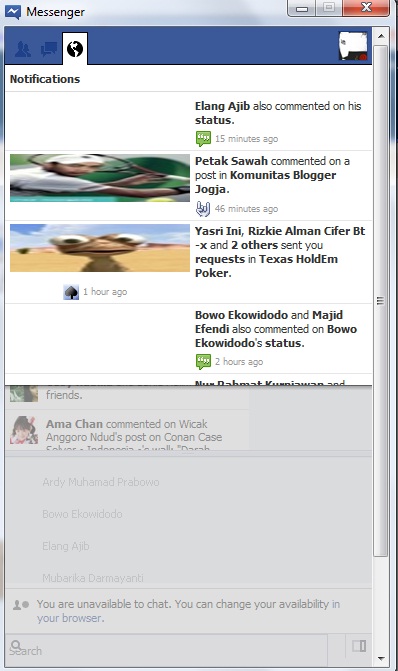
    Download Facebook Messenger Terbaru

    Kurang lebih seperti gambar di samping itulah aplikasi terbaru dari facebook yakni Facebook Messenger Terbaru. Dengan aplikasi Facebook Messenger Terbaru anda bisa chat langsung dengan teman anda dan juga notifikasi yang langsung ada jika ada seseorang komentar atau mengomentari status anda.

    Penasaran pengen mencoba memakai Facebook Messenger Terbaru ? Silahkan Download Gratis Facebook Messenger Terbaru di link yang saya berikan di bawah ini :

    [Download Facebook Messenger Terbaru] [Mirror]

    Download Facebook Messenger Terbaru dan untuk Android dan BlackBerry akan segera di susulkan di Azhie Blog , selamat mencoba( 5.0 )